


Law firm know-how exists in many forms: precedent banks, checklists, playbooks, practice notes - and partners’ heads.
It is valuable, hard-won, and seen by firms and their clients as a key differentiator. It is also notoriously difficult to capture and maintain. Lawyers rarely have time to document how we work, and some are understandably reluctant to give away hard-earned expertise. Plus, there’s always that sense that “every matter is different”. What this means is that when a partner retires or a senior associate leaves, much of that tacit knowledge leaves with them.
A new agentic standard is emerging that I think might change this whole dynamic and it’s called Skills.
What are Skills?
Skills are a standard introduced by Anthropic – the company behind Claude and the Model Context Protocol (MCP) standard. With Skills, Anthropic is saying - agents are powerful, but real knowledge work requires an agent to follow company-specific processes and precedents.
A Skill is surprisingly simple. It’s a folder that teaches Claude how to do something specific. At its simplest, it contains a SKILL.md file (basically a text file that you or I can read) with instructions. At its most sophisticated, it’s a complete package of expertise: workflows, reference materials, automated scripts, and reusable assets.

Here’s what goes inside:
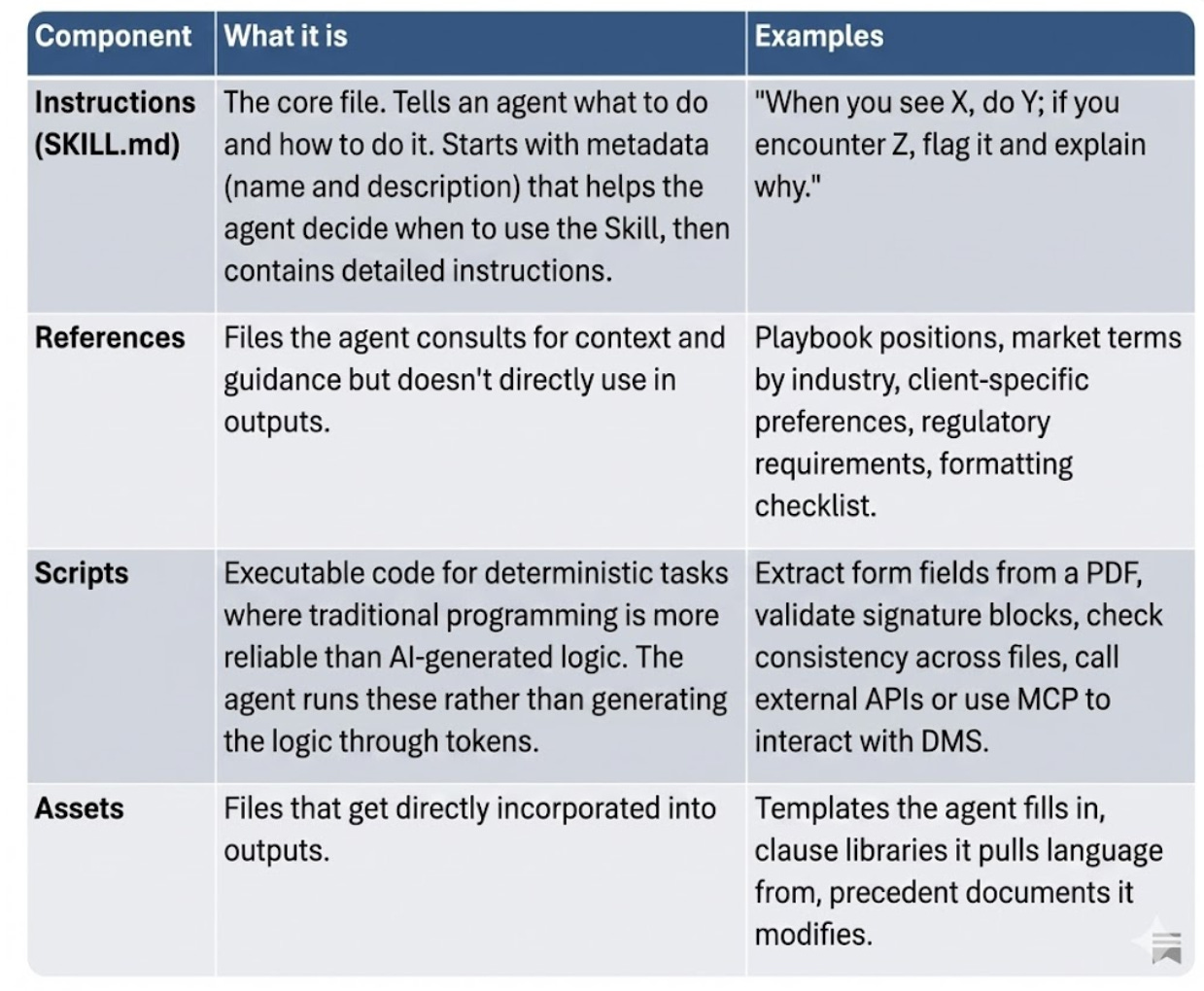
Fig 1: What’s in a Skill? (Side note: Why is Substack so bad at tables?)
When an agent loads a Skill, it transforms from generalist to specialist. The Skill tells it: this is how we do this type of work, these are our standards, these are our preferences, this is when to flag issues for human attorney, and so on.
One of the cool things about skills is how they help navigate a key limitation of agents – context windows. They use something called progressive disclosure. What this means is that the agent doesn’t load the entire Skill into its context window upfront because that would use up tons of context. Instead, it works in layers, a bit like a lawyer reading the contents page of a long agreement before jumping in. This architecture means you can bundle extensive knowledge into a Skill without overwhelming the agent’s context window every time.
Can Agents Have Multiple Skills?
Yep. Multiple Skills can run simultaneously and the agent automatically identifies which Skills are needed and coordinates their use. (Seems the best practice is separate SKILL.MD files for each Skill. I don’t know if there’s an absolute limit. The Anthropic API has a limit of 8 Skills right now.)
Imagine you’re reviewing a customer contract for a repeat client in a regulated industry. The agent might load a bunch of Skills:
Your contract review Skill (general negotiation positions)
A client-specific Skill (this customer’s particular preferences and risk tolerance)
A regulatory compliance Skill (industry-specific requirements)
Your document creation Skill, which in turn interacts with an external drafting service (to generate the redline)
Skills vs Prompts vs Tools
Skills sit alongside other ways of customising agents:
Prompts. One-time instructions for a specific task (or system prompts telling an agent how to behave generally). Skills are a bit like reusable instructions for a type of task that the agent decides when to use (combined with the other bits, like executable code).
Custom instructions apply universally to everything an agent does for you. They’re broad preferences like “don’t use emdashes ever” or “always ask clarifying questions before starting”. Skills are task-specific and only activate when relevant.
Tools are actions the agent can take, either in the app in question, or a third party app. They can connect the agent to external systems and data: web search, code execution, database queries, API calls. Tools provide capabilities, while Skills teach the agent how to use those capabilities according to your specific workflows and standards.
MCP (Model Context Protocol) connects your Agent to external data sources and services through standardised tool interfaces. You might use MCP to connect to your document management system, and use a Skill to teach the Agent how to properly categorise documents, apply your naming conventions, and route them through your firm’s review process.
Show Me Some Skills!
OK we’re there. In theory, almost any task performed by a lawyer could be documented in a Skill. Let me walk through a few examples. (Health warning - these are just from a 30-minute brainstorm this afternoon so go easy on me - they are not production-ready but hopefully provide some ideas).
Contract Review Skill
A contract review Skill could encode your entire negotiation playbook. When an agent reviews third-party paper, it applies your firm’s substantive positions, evaluates deviations against market norms, and suggests alternative language drawn from your own precedents.
contract-review/

├── SKILL.md

├── references/

│ ├── playbook.docx

│ └── market-terms.md

└── assets/

└── clause-library.docx
The SKILL.md file is where the workflow logic lives. The cool thing is it’s human-readable too. It might include instructions like:
## Review Workflow

1. Identify the contract type and governing law

2. For each clause, check against the position in playbook.docx:

- If our preferred position: no markup needed

- If acceptable fallback: note in comments, continue

- If outside tolerance: flag for negotiation, suggest

alternative from clause-library.docx

3. Cross-check jurisdiction-specific requirements in references/

4. Generate summary of key commercial points and recommended

positions

## Escalation Triggers

Flag for partner review if:

- Uncapped indemnities in favour of counterparty

- Liability caps below [threshold]

- Non-standard governing law or jurisdiction

- Assignment rights that conflict with client policy

## Execution

1. Where Partner review needed, assign to Partner via Lupl tool

2. Retrieve contract from DMS via MCP tool

…
Now, this skill could also connect to your document management system via MCP (iManage announced support last year, for example) to save the marked-up version back - with proper metadata, version control, and an audit trail. Another key part is approval routing, so it could integrate with a system like Lupl - if the Skill says an issue must be escalated to a Partner for approval, you could assign that approval to the right person via Lupl and trigger an email or Teams message with the iManage link incorporated.
Due Diligence Skill
We all carry mental models for due diligence: what to look for in a lease, how to spot a change-of-control trap in a material contract, which representations actually matter for the deal at hand. A due diligence Skill might turn this tacit knowledge into explicit, repeatable instructions.
due-diligence-ma/

├── SKILL.md

├── references/

│ ├── review-standards/

│ │ ├── leases.md

│ │ ├── material-contracts.md

│ │ ├── employment.md

│ │ └── ip-assignments.md

│ ├── red-flags.md

│ └── request-list-template.md

└── checklists/

└── closing-checklist.md
The SKILL.md orchestrates the entire process:
## Document Routing

Route each document to the appropriate review standard based

on type:

- Leases → references/review-standards/leases.md

- Employment agreements → references/review-standards/

employment.md

- [...]

## Issue Classification

For each issue identified:

- Critical: Requires immediate escalation. Deal-breaker

potential.

- Material: Include in summary. Likely negotiation point.

- Notable: Log for completeness. Unlikely to affect deal.

- Administrative: Wrong date format.

Flag for cleanup.

## Output Format

Generate:

1. Exception report organised by category

2. Updated checklist with status

3. Draft request list for missing items

## Execution

1. Use Data Room tool to pull files from Data Room

…
Client-Specific Skills
Repeat clients accumulate preferences – e.g., approved fallback language, risk tolerance levels, internal approval thresholds, comment balloon quirks. This knowledge typically lives in partners’ heads or is scattered across email chains.
A client Skill could capture all of it in one place:
clients/acme-corp/

├── SKILL.md

├── references/

│ ├── approved-positions.md

│ ├── internal-contacts.md

│ └── billing-guidelines.md

└── templates/

└── engagement-letter.docx
Every new matter starts with this context already loaded. The agent knows that ACME prefers Delaware law, won’t accept mutual indemnities, requires sign-off from their deputy GC for anything above $500k, and wants comments balloons address to the ACME business unit, not the legal department.
Connect this to your matter management platform, and the right client Skill activates automatically when a new matter opens. The associate doesn’t need to ask around for client preferences - they’re already embedded in the workflow.
But Will Lawyers Actually Create These Skills?
Indeed, don’t all the old issues persist? Let’s look at each objection and why I think Skills may be different.
1. Lawyers are too busy to document know-how.
Guess what – Claude Code already has a “Skill” for “Creating Skills”! Skills don’t require lawyers to stop and document how we work. If an agent is deployed to a matter or triggered at matter closeout it can in theory observe how the matter (or a task) was handled and propose updates to an existing Skill, or even generate a new one. No post-matter KM surveys - this could be a kind of “driverless KM”. (And even if it’s not totally driverless, Skills can easily be vibecoded.)
2. Every matter is different.
Skills are actually a great way to handle variation. They are not fully deterministic (although they can have deterministic executable components or link to deterministic systems). A Skill can encode positions, fallback language, and escalation thresholds, while leaving room for context and judgment. The agent applies that guidance to new documents and new fact patterns, adapting as needed while staying within defined parameters.
3. Lawyers won’t give their knowledge away.
We don’t have to. A Skill doesn’t have to be public (and let’s face it, lawyers are unlikely to rely on public skills because every firm has its own way of practising law) It can sit with a practice group or a team. Access can be controlled and use can be limited. In time, Skills may even become assets that firms package, license, or sell as part of productised services. (I think this is slightly different to the “workflows” Harvey and Legora are trying to productise with their customers, which are more like predefined chatbot interactions, though they will no doubt evolve into this.)
Is there a Practical Law or LexisPSL of Skills?
Not yet. But if Skills become central to how firms work, expect to see Skills Libraries (and maybe even a Practical Law/LexisPSL of Skills?) emerge as a new category of knowledge infrastructure.
A mature Skills Library might include:
Practice area Skills: Contract review, due diligence, regulatory filings, each encoding your firm’s specific approach and standards
Client Skills: Major clients’ preferences, risk tolerances, approval thresholds, formatting requirements, automatically loaded on new matters
Jurisdiction Skills: Local law requirements, filing procedures, regulatory quirks, making it possible for any lawyer to work competently in unfamiliar jurisdictions
Process Skills: Closing mechanics, discovery workflows, transaction management protocols
Getting Started with Skills
Skills are open, but work best across Claude’s platforms right now, so pick whichever fits your workflow.
Claude.ai or Claude Desktop (Pro, Max, Team, Enterprise)
Go to Settings → Capabilities. You’ll see Anthropic’s pre-built skills (document creation, spreadsheets, etc.) already available. Toggle them on. To add your own, create a folder with a SKILL.md file, zip it, and upload via “Upload skill.” Your Skills appear in the list alongside Anthropic’s.
Claude Code
Skills live as folders in your filesystem. Create a directory at ~/.claude/skills/ (global) or your-project/.claude/skills/ (project-specific). Add a SKILL.md file with your instructions. Claude Code discovers them automatically and invokes them when relevant.
API
Skills work via the code execution tool. Reference pre-built skills by their skill_id (e.g., pptx, xlsx) in the container parameter, or upload custom skills via the /v1/skills endpoints. Custom skills are shared organisation-wide.
The simplest possible skill
Create a folder. Add one file called SKILL.md:
---
name: nda-review
description: Reviews NDAs against firm standard positions. Use when reviewing confidentiality agreements or NDAs.
---

# NDA Review

## Workflow
1. Identify the NDA type (mutual/one-way) and governing law
2. Check each clause against references/standard-positions.md
3. Flag deviations and suggest alternatives
4. Generate sum
Resources
Anthropic has open-sourced example skills at github.com/anthropics/skills. The skill-creator skill (yes, it exists!) can help you build new ones. And agentskills.io documents the emerging standard if you want skills that work across platforms.
The Takeaway
As you’ve probably guessed, I’m long on Skills (and long on Claude Code, though Skills are becoming an open standard). I do think Skills could represent a shift for KM systems from systems of content to systems of action. Not just documented, not just searchable, but actively applied by AI in the course of delivering legal work.
For firms thinking about the multi-channel future, Skills could be a foundational infrastructure.
Of course, there’s a way to go. Skills are built for action, and we’re still early in terms of deploying true agents that take action within legal practices. Chatbots and tabular review are not systems of action. And there are many things we all need to work out from a compliance perspective when deploying true systems of action.
But while we are early, I do think Skills (or their successor standard) will end up being a central part of law firm KM in the not-too-distant future.
If you’re experimenting with Skills in your firm, I’d be interested to hear how it’s going!