


For as long as most of us can remember, knowledge work has lived in four static containers: Word, Excel, PowerPoint and PDF.
As lawyers, we tend to produce one of the four (usually a Word doc), attach it to an email, and move on.
But why is that? Information is rich. It has connections and dependencies, it’s dynamic, it moves, it shifts. And people process information in different ways. Flat text on a static page in a document container is a very specific way of conveying information but it is not the only way.
For various reasons, I think knowledge work is about to break free of the document, and I think this is a good thing.
Why always a document?
For most of the last few decades, a handful of formats won for basically three reasons.
They were the digital successor to established analog formats. A Word document UI is literally a piece of paper. An Excel looks like an old ledger. They are familiar and match existing mental models.
Everyone can work with them. If you send someone a PDF, you know they’ll be able to open it.
Anything richer meant briefing engineers and designers, finding budget, and waiting weeks. So we flattened the idea onto a page, because that was something you could make yourself, today, for free.
What is changing?
First, a cluster of tools and capabilities have arrived.
You can now describe the thing you want to create in plain English and get working software, interactive artifacts or dynamic content back, without an engineering team.
Here are a few examples (but there are many more):
Claude Artifacts. These are like “mini-apps” where you can generate an interactive calculator, simulator or dashboard inside a chat, then share it with your team and even lock it down to your organisation.
ChatGPT Sites and the like. Similar to Artifacts, these let you turn a prompt into a shareable page or microsite, no web developer required.
Google NotebookLM. Turn your documents into an audio overview people can listen to on the commute, watch a video summary, or generate study cards.
Process or structure visualisations. Like Lupl’s LPM Gantt charts, or StructureFlow’s transaction structures.
Second, words themselves are abundant. I don’t know about you, but I receive much longer emails these days. Anyone can generate a polished ten-page memo in seconds, so everyone will, and inboxes are filling with competent-looking, forgettable and often meaningless prose. When words are that abundant, attention is the scarce thing. A wall of text now competes with an endless supply of other walls of text, and struggles to cut through on its own.
So the transfer of information that was the whole purpose of producing the thing fails.
What this looks like in practice
Before I go any further, I should be clear: I am not saying that words or documents are inherently bad.
Writing and thinking are intrinsically linked and writing drives precision and sharper thinking. A bunch of pictures or high level slides can be a convenient way to dodge getting into the detail. Jeff Bezos famously requires all his executives to draft memos in prose rather than PPT slides. In the world of legal work, it will remain important. Doing the work and applying your thinking will be more important than ever.
What I am saying is these four formats don’t have to be the only way of conveying information now.
What I’m really proposing is design thinking for knowledge work. Start from the user and work back. Who is this information for? What do they need to do with it, and when? Do they need my conclusion, or the ability to reach their own? Answer that first and then decide the format.
Here are some examples:
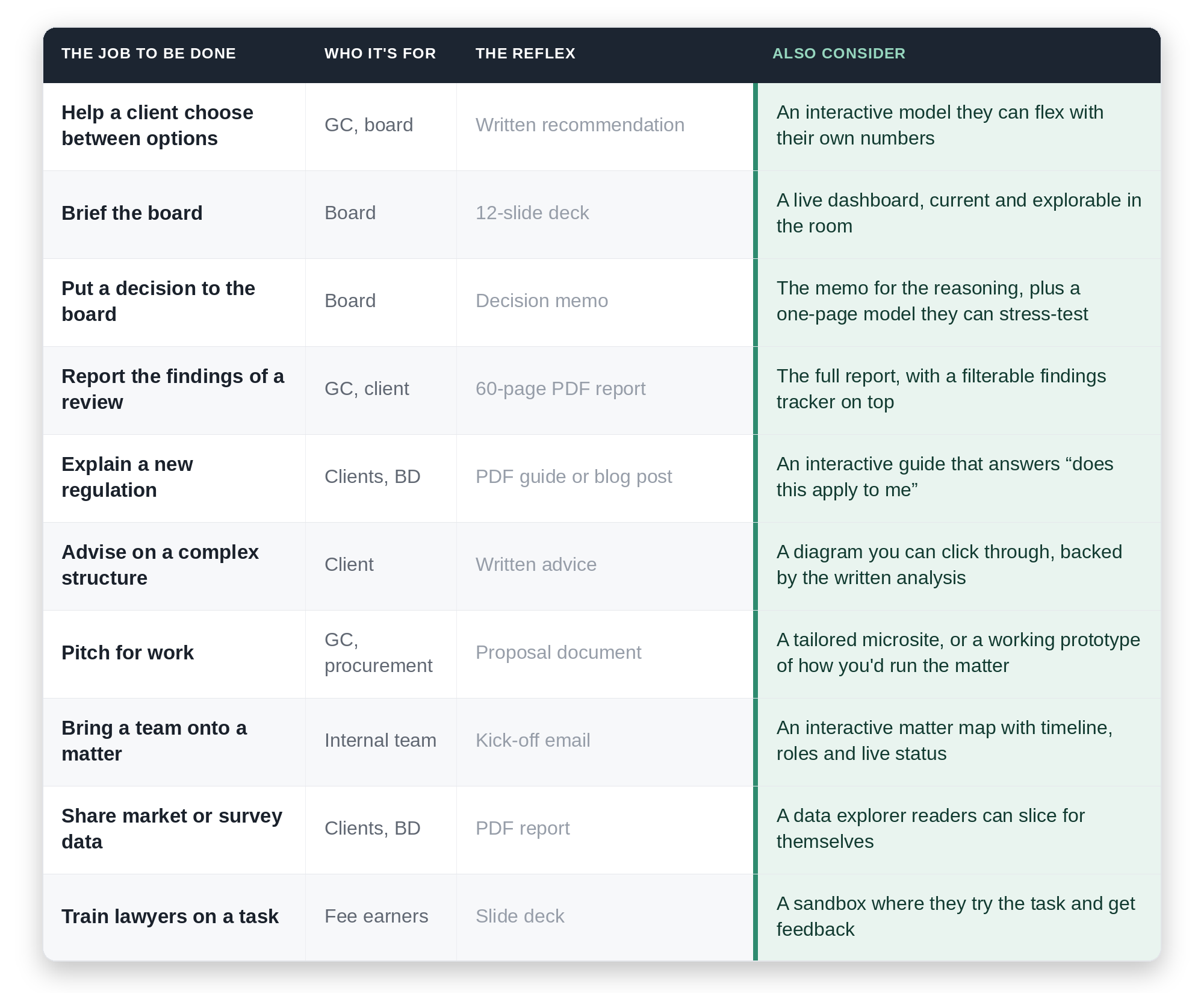
Often, this might not be an either/or, but about layering by audience. Maybe the client skims the interactive summary and moves the two assumptions that matter to them. The associate who picks the matter up in six months reads the memo in full. The board sees a single dashboard, with the analysis one click beneath it.
A blast from the past
Here’s another example for you, and it comes from about 15 years ago.
When I was a junior lawyer at Olswang (now part of CMS), we were asked by a large UK telco to pitch for their panel.
We happened to have a lawyer on the team who could write code, and we saw an opportunity to approach the pitch differently. We built a mobile app (back in the days when that itself was cool), preloaded it onto a handset, put it in a display box and delivered it to the General Counsel.
The app had a visual overview of the team and how we’d run the matter. Everyone else sent a proposal and we won the pitch.
The only thing that has changed is the price. Back then that move took a lot of effort and lead time, so it was reserved for the big pitch, and the result was pretty basic. Today it is a Tuesday afternoon’s work and you can build almost anything.
Some practical suggestions
An interactive artifact is a living thing, and that raises some new questions. Before you build one, decide two things:
Who gets access. A Claude Artifact can be kept inside your organisation (in the Team and Enterprise plans, you can lock this down), which is great for internal tools and controlled sharing. The moment you publish something as a public website, you need to consider things like who should be able to see it? Does it expose client data? Does it need a login? These things matter less if you’re writing a more dynamic version of a law firm blog post (i.e., public non-sensitive information) but are obviously critical if you are sharing privileged information. Know your limits and get input from your IT and Security teams.
Who maintains it. A document is done the day you send it. A live tool is not. Someone owns authentication, maintenance, security, and what happens when the underlying data or the law changes. If nobody owns it, a slick interactive asset can become more of a liability.
The takeaway
My proposition is not that these four document formats are dead, or that we should vibecode everything and not bother to sit down, think and write.
It’s that what we produce no longer needs to be constrained to these four formats. We can start from the user of our content and what they need to get done with the content we are creating.
Sometimes the answer is a document. Sometimes it’s a dashboard or a video. Sometimes it’s a both.
I think this is very exciting for our ability to transfer information effectively, drive better decisions and improve collaboration.
This could change how work moves and how knowledge is absorbed, and that might transform (for the better) how we think and work together.